DriveBuddy is my newest indispensable tool. If you’re like me, you have a stupid number of hard drives containing samples and sampling instruments, archived projects, backup files, Time Machine backups, sound experiments, etc. This data is spread across a collection of portable solid-state drives and hard disk drives.
The trouble is, I don’t want to keep all these drives plugged in all the time. Also, it is easy to lose track of what data resides on each drive and what sort of storage capacity is remaining. This is crucial information when downloading a particularly large sample library or searching for that cool sound you used in a project years ago.
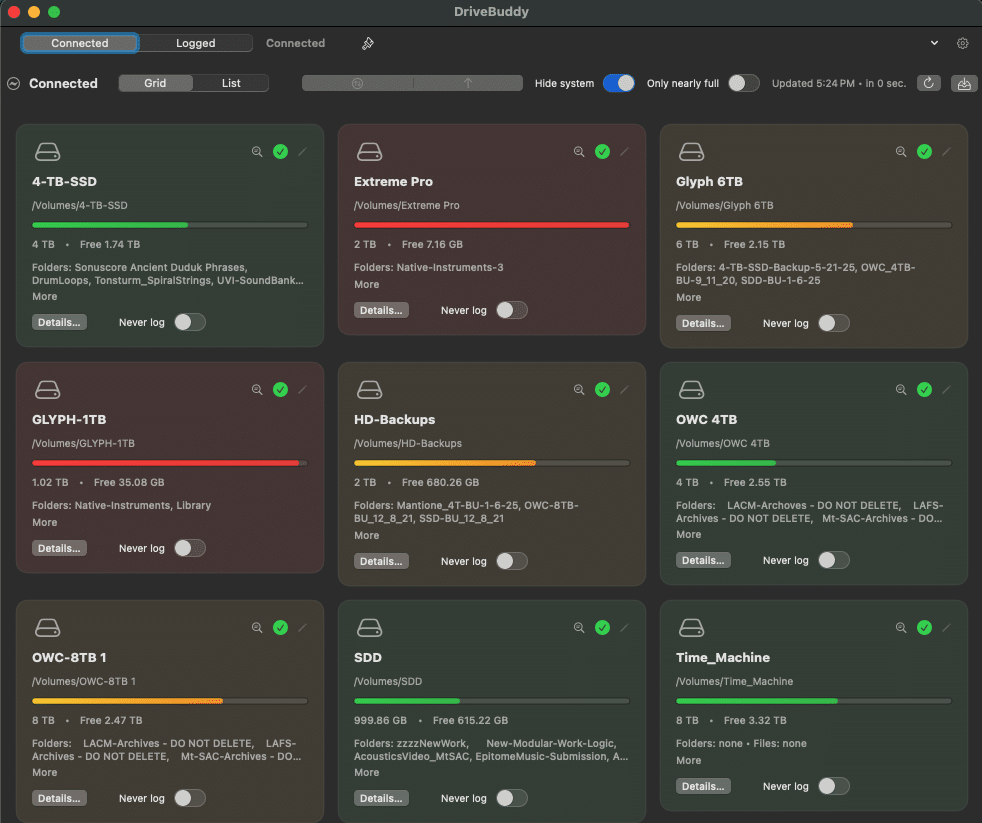
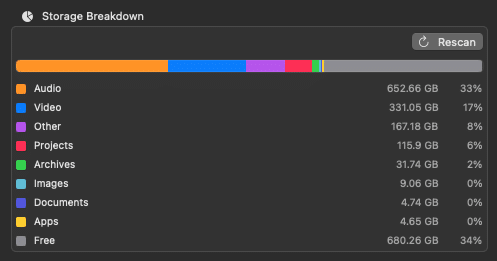
Enter—DriveBuddy, a simple-to-use, powerful app that allows you to search multiple drives even when they’re not plugged in. To initialize the process, simply plug in your drive, open the app, and DriveBuddy does the rest. Not only does it provide a directory of every drive in your system, but it also gives you a breakdown of the types of files by size and percentage of storage used. You can choose to index or re-index automatically based on how you use each drive.
IS DRIVEBUDDY WORTH IT?
Yes! This is probably the shortest review I’ve ever written about the simplest app I’ve ever used. But a good idea deserves some attention, and the utility of this application makes it well worth the 20-buck investment for all you data hoarders out there.
EXTRAS
Want to win a free license to Kontakt 8? Be one of the first 1000 people to FOLLOW WAVEINFORMER ON INSTAGRAM to be automatically entered to win one of three full-version Kontakt 8 licenses! Read more.
Assess your knowledge of essential audio concepts using our growing catalog of online Quizzes.
Explore more content available to Subscribers, Academic, and Pro Members on the Member Resources page.
Not a Member yet? Check the Member Benefits page for details. There are FREE, paid, and educational options.