If there’s such a thing as “vintage audio software,” then Numerology by Five12 surely deserves a spot in that category. In a field where “newer” is often equated with “better,” Numerology leverages a history spanning multiple decades, providing sequencing possibilities that can easily hang with – and in many cases, utterly surpass – the newest entries in that category.
(Note: Numerology is Mac-only, so Windows and Linux users should proceed with the expectation of extreme FOMO.)
Conventional wisdom says that as computers become more powerful, developers are able to use increasingly complex and demanding algorithms in their real-time software. This can easily lead to the conclusion that a contemporary plugin will automatically be “better” than one from several years back, due to the increased sophistication of technology over time.
Personally, I thoroughly enjoy geeking out over the latest cutting-edge software developments, exploring plugins that push the power of contemporary processors to their limits. I’m also not immune to the charms of a flashy, contemporary GUI, replete with resizable high-resolution images and animated graphics. And there’s no shortage of older plugins that “sounded good for their time,” but have long since fallen by the wayside as the field has matured.
With all that said, there are some genuine classics in the music software world. They may not be the darlings of contemporary production trends or forum discussion, but they possess features that have been honed and refined over many years, and continue to inspire users to this day. Many long-time software musicians and engineers have at least one or two older plugins that are essential parts of their regular workflow: not just because of their personal familiarity with these tools, but because, in many cases, those tools have yet to be surpassed in what they do.
This brings us to Numerology: an extraordinarily deep software sequencing environment which first emerged in 2004 at the hands of developer Jim Coker. 21 years is a monolithic period of time in the world of audio software, but Numerology has grown and evolved over that time, and is still actively supported today. It’s more than just “a sequencer” – it’s an entire modular ecosystem, containing a wide array of components that can be combined in a huge variety of ways. It approaches the idea of sequencing from countless angles, and the depth and breadth it offers are genuinely staggering.
But a big part of what makes Numerology so powerful is not just its capacity for labyrinthine networks of complexity, but also the fundamental depth present at the most basic level of its individual modules. In this article, we’re focusing on Numerology’s mono note sequencer, and some of the more rarefied and powerful options it contains. Parameters and functions like step length, random jump, and step repeat aren’t completely unheard of, but they’re also not widely available, so finding just one of them in a sequencer is pretty rare. Seeing all of them available simultaneously is a daunting prospect indeed, but Numerology offers them, along with a host of other exotic possibilities, in one of its most basic devices.
This article barely scratches the surface of what Numerology is capable of; using a single module by itself is about as basic as this software can get. But it speaks to the depth of that environment that even a seemingly humble single module contains a multitude of rarities.
The synth used for this article is Zebralette 3. It’s a freeware soft synth by u-he – another developer with a decades-long body of work – and you can download the patch used for this article here.
NOTE: Each musical example below is presented in two forms: the sequence by itself, and in conjunction with a drum loop. The presence of drums is to help “ground” some of the more abstract musical examples with a straightforward pulse, and to suggest ways that exotic sequencing ideas can coexist with a conventional 4/4 rhythmic foundation.
STARTING FROM SCRATCH
When we open a new instance of Numerology, this is the first thing we see.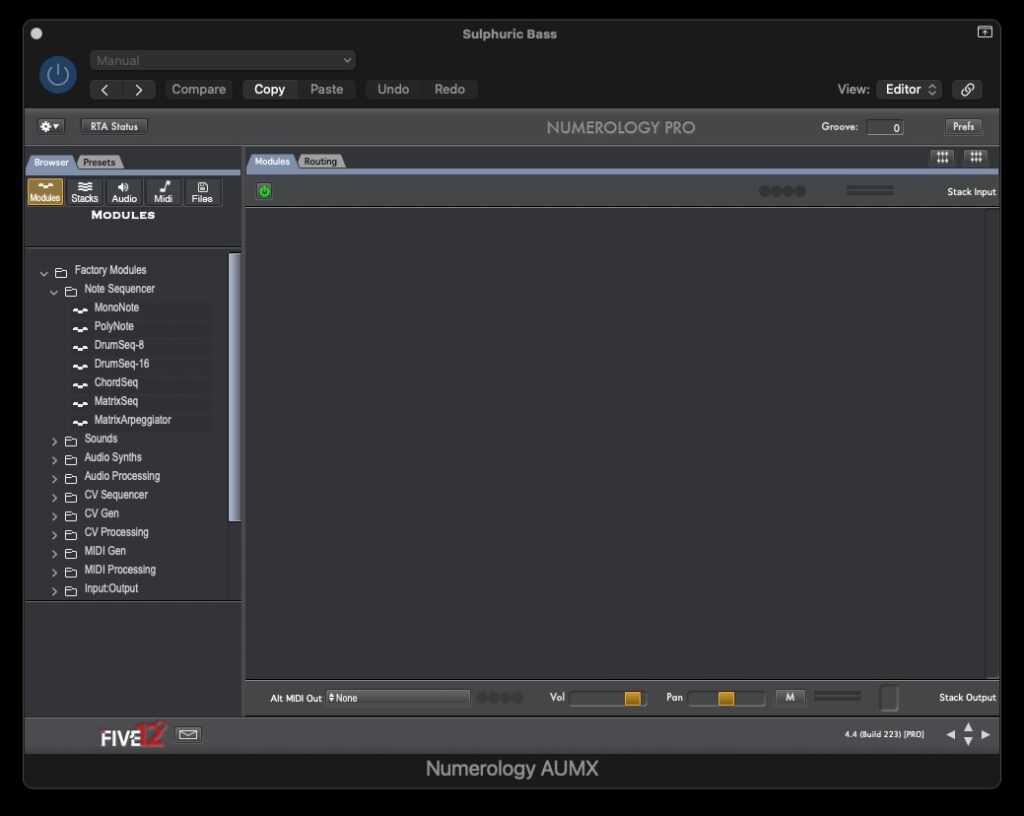
The left-hand column shows different categories of available modules, while the right-hand space lets us view the details of any active modules. In its default state, Numerology doesn’t have any modules loaded, so right now that area is empty.
We’re going to click and drag the mono note module into the main space, which will give us this display: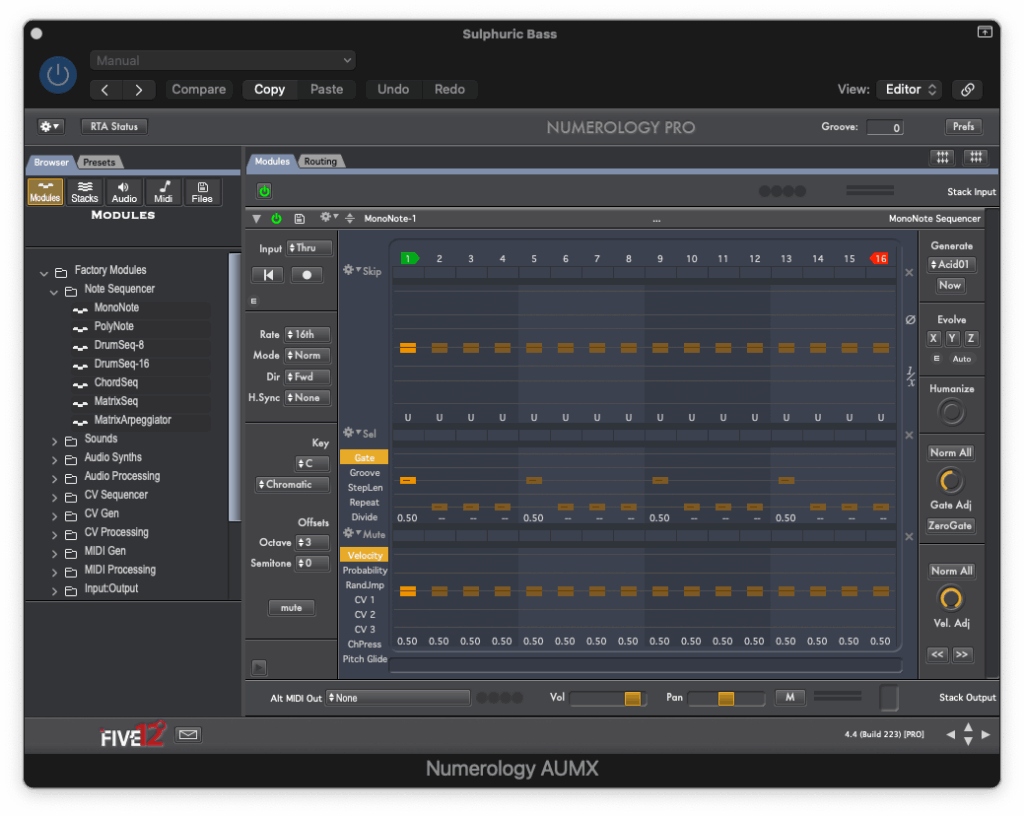
Pressing Play on the transport gives us this sound:
The reason we’re only hearing four notes right now is because of the mono note module’s gate settings. By default, only the 1st, 5th, 9th, and 13th steps (beats 1, 2, 3, and 4 in a bar of 4/4 time) have active gate values. All of the other steps are “off” (displaying “–“), meaning that they produce no sound. (In Numerology, even a gate value of 0.00 produces a very short note.)
ADDING VELOCITY
We’ll add more notes shortly, but first, we’re going to adjust the velocity of the four currently audible steps.
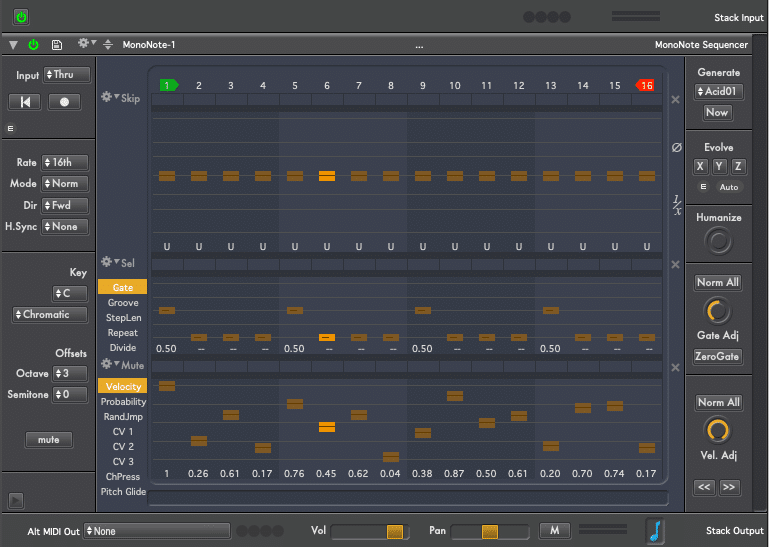
The timbre of this particular synth patch responds to velocity values. As steps 1, 5, 9, and 13 gradually decrease in velocity, the timbre goes from brighter to darker.
You might notice that we’ve also changed velocity values for the other 12 steps. But we’re not hearing those steps yet, because their gate values are still “off”. In the next example, we change that and start bringing up the gate values for the unheard steps.
OPENING THE GATES
Now we’re creating positive values for the gate of every step in the sequence.
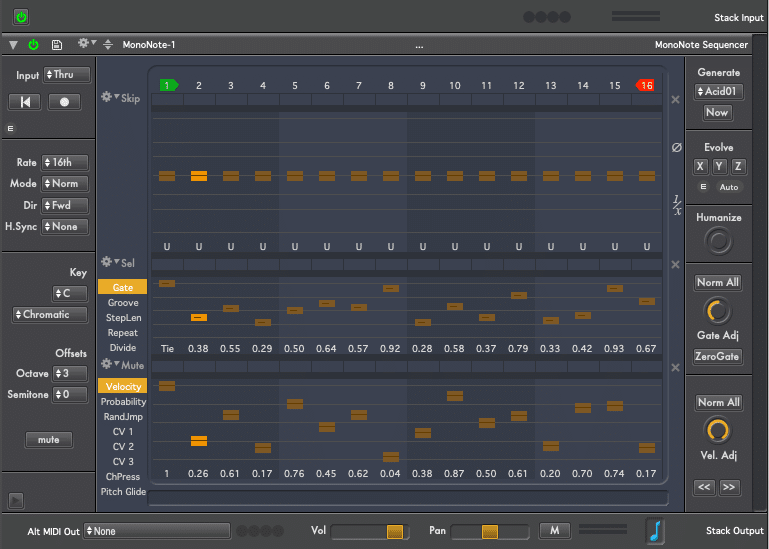
We already entered a variety of velocity levels for these newly-heard steps during the previous example, but we couldn’t hear their effect until now. With all 16 steps set to different velocity levels, the timbre of the synth percolates with the influx of different values.
Here’s a cool detail: the first note actually covers two steps’ worth of time, because its gate is set to “Tie.” Just as lowering the gate below 0 turns the step off, increasing gate above 100 assigns a tie to that step. (The following examples will have the gate level for that step lowered so the tie will be gone.)
PITCH
Each step is still outputting the same musical pitch, so let’s change that up. We have the pitch quantization set to C minor, so any available pitch setting will snap to the nearest note in that specific scale.
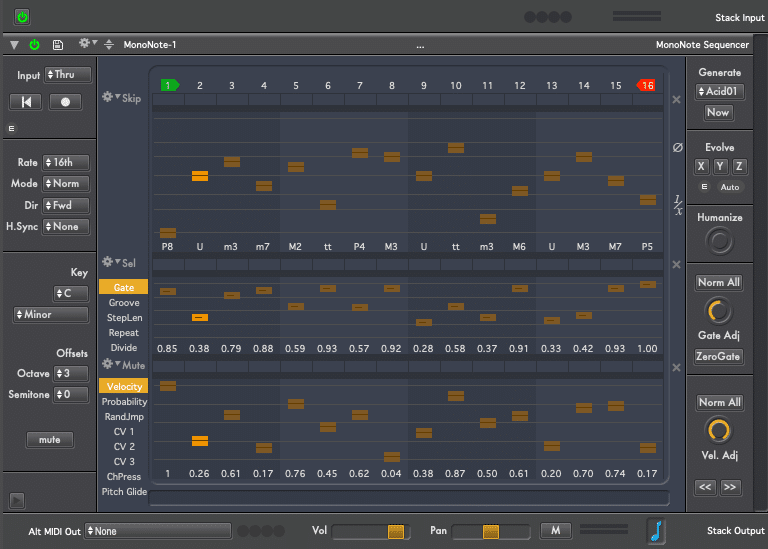
So far, these are all pretty common functions that you could reasonably expect to find in a standard contemporary sequencer. Let’s start exploring some more exotic possibilities.
STEP LENGTH
Step Length determines what rhythmic value each step will take. By default, each step is set to 1. Because the rate parameter is set to 16, this means that each individual step lasts a 16th note. Here again, this is standard fare for most sequencers.
But the Step Length parameter can break out of that 16th note paradigm by letting us make steps that are longer or shorter than that. So, a Step Length value of 2 will produce an eighth note, a step length value of .5 makes a 32nd note, 1.5 is a dotted 16th note, and so forth.
The implications of this are immense because by changing just one step’s length by just the smallest possible amount, this 16-step sequence no longer lasts for exactly one bar of 4/4. Needless to say, the results can be extremely complex and unpredictable.
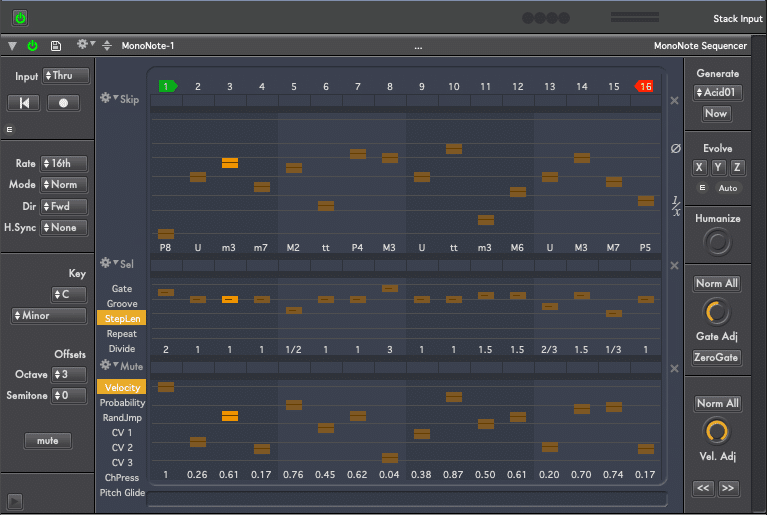
In the following example, we begin with all step length values at 1, and then start adjusting them on the fly. The example with drums is particularly enlightening here, because the drums stay in 4/4 while the sequence length expands and contracts, depending on the total value of the combined step lengths at any given time.
REPEAT
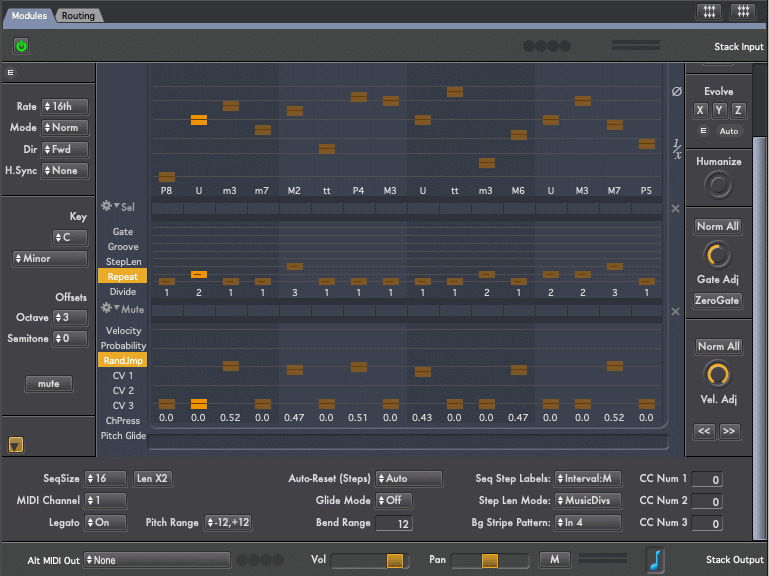
Now we’re going to expand on this concept with the Repeat function, which will replay any step a specific number of times. Adding different repeat values to steps that already have unusual step lengths gives the sequence an almost 3D quality. Superimposing 4/4 drums against this sequence creates a tension-and-release effect, as the sequence continuously breaks away from the beat, and then lines back up with it in unpredictable ways.
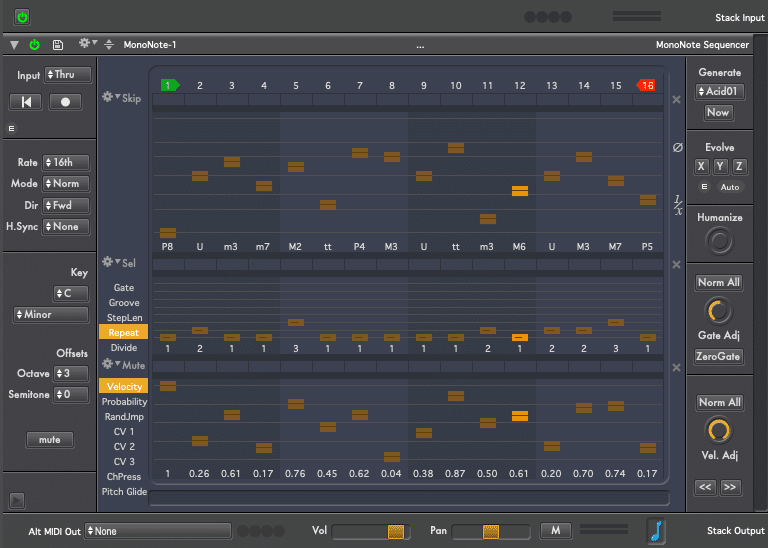
RANDOM JUMP
Random Jump does just what it says: the higher the value, the greater the probability that when that step is reached, the sequencer will move to a new, randomly-chosen step, and then resume playback from that point. This is a very different kind of effect than randomizing the playback of every step, which is a common function on many sequencers, and which tends to obscure or “hide” the underlying sequence.
By contrast, Random Jump plays back recognizable fragments of the sequence, depending on the point that it jumps to. By adding multiple random jump points and repeating chains of notes that lie within or outside of those spots, the sequence is fragmented into an array of recognizable, repeating phrases. This definitely falls into the “easier to demonstrate than to describe” category, so have a listen to this example, both with and without drums.
ONE STEP AT A TIME
For the last several examples, we’ve applied multiple simultaneous forms of rarified abstraction to our sequence. Now, let’s start whittling those away one at a time, bringing the sequence back to states of (relative) normalcy. In this example, we gradually reset the step length value for each step to 1. By the end of the process, each step in the sequencer is exactly one 16th long.
But Repeat is still active. This means that the overall sequence is still outside the confines of 4/4, because each repeat effectively adds an extra playback step. (For instance, repeating just one note one time will nudge a 16-note sequence out of 4/4, and into 17/16.)
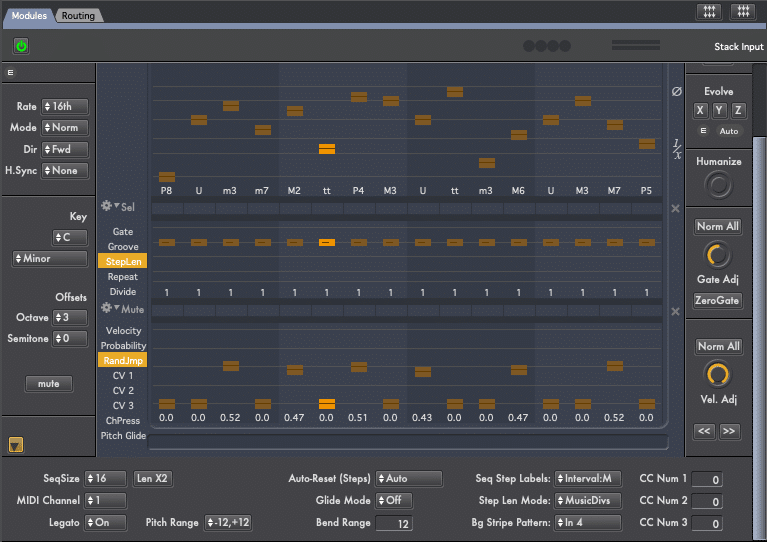
NO REPEAT
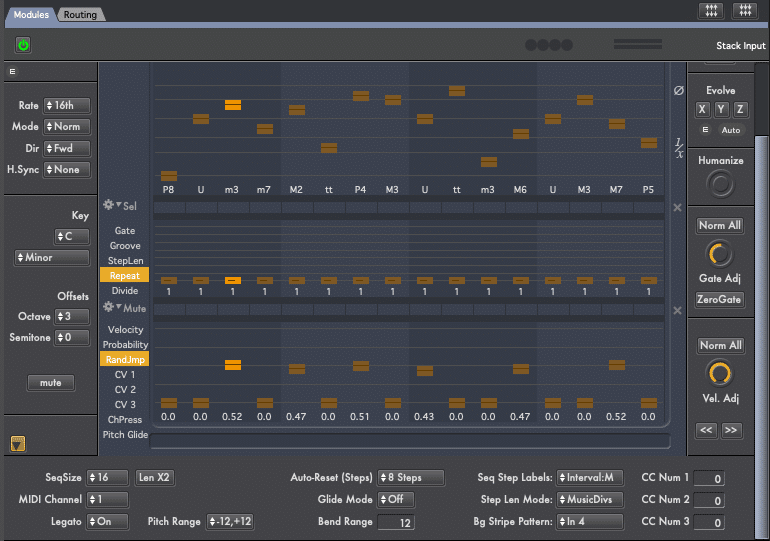
Now we’re setting the repeat parameter back to a single instance for each step. By the end of this example, the only active modification to sequencer playback is Random Jump.
RESET
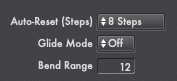
All of the more esoteric functions we’ve discussed have the effect of knocking the sequencer playback out of 4/4 time. But we can have both things at the same time, thanks to a function called Auto-reset. It means that after a given number of steps, the sequencer will automatically restart from step one. In the following example, Random Jump is still active. But it’s being “reigned in” by auto reset, which restarts the sequence from the beginning after (in this particular case) 8 steps. Hearing the sequence reset against the drums helps underscore this effect.
ACCELERATED EVOLUTION
The Evolve section is one of Numerology’s secret weapons. It’s a system for introducing variations into a sequence, either manually or automatically. In this case, we’re going to use the Auto-evolve function.
Opening up the Evolve controls displays a range of different functions available for manipulation. The X, Y, and Z lists are three different sets of constrained randomness, each of which can contain its own unique set of commands. Furthermore, each list can be played back either by itself or in conjunction with other lists. For each potential randomization, there’s also a probability control to determine the likelihood of that transformation occurring.
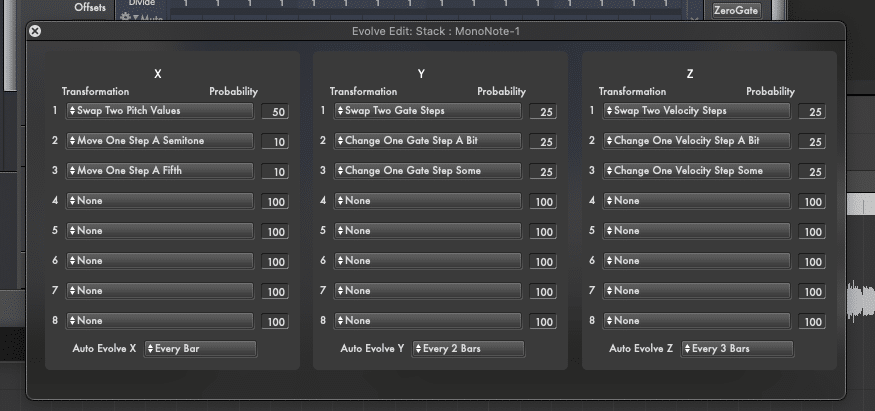
For the most part, this next example uses the default evolve settings, as displayed above. The one change we’re making is to the Auto-evolve parameter, which determines how often a new modification might happen. We’re setting each of the X, Y, and Z columns to different auto-evolve lengths, in order to have different types of modulation unfold at different rates.
Here’s one example of Auto-evolve working in subtle but significant ways. At 0:17 of the demo, the pitch of the first step is shifted: instead of beginning with a low C, the sequence now starts with a high G. The sequence continues in this manner until around 1:33, when the pitch of step one returns to a low C.
SOLO EVOLUTION
Finally, we’re turning off Random Jump and Reset, so that auto-evolve is the sole modifying element in the sequence. This is possibly the most subtle form of sequence variation we’ve explored for this article, but it’s also one of the most conventionally “musical” and effective. The pitch, gate, and velocity of steps are shifting, but doing so in a slow, subtle, almost subliminal manner.
CONCLUSIONS
There are still many great functions in the monophonic sequencer that we haven’t touched on. That’s not even getting into any of Numerology’s many other modules, or the endless possibilities to be had in chaining several modules together in myriad ways.
Numerology isn’t a darling of current trends, it doesn’t have a flashy UI, and there aren’t new features being added on a regular basis. But it possesses over two decades’ worth of development that’s extraordinary in both depth and breadth, and it’s still actively supported and updated to keep pace with the evolution of MacOS. If you’re curious about some of sequencing’s more intermediate and advanced possibilities – or if you just want to explore an immensely deep and fascinating creative landscape – Numerology is a must-try piece of music software.
ABOUT THE AUTHOR
Andre LaFosse is a music teacher and transcriber, guitar owner, producer/engineer, composer/improviser, devil’s advocate of live looping, synthesizer dilettante, and general tortured artist. He is equally at home and/or out of place in the worlds of instrumental performance and electronic programming. His music-making explores various ways of reconciling, uniting, contrasting, and/or fighting those two facets of sound creation. A graduate of California Institute of the Arts, Andre’s work has been covered in publications and outlets including Guitar Player, Electronic Musician, Tape Op, Time Out New York, WNYC Radio’s New Sounds, Alternative Press, Make Weird Music, and many others. His recorded body of work is currently available through 7D Media. Check out his YouTube Channel for reviews and product demos.
EXTRAS
Want to win a free license to Kontakt 8? Be one of the first 1000 people to FOLLOW WAVEINFORMER ON INSTAGRAM to be automatically entered to win one of three full-version Kontakt 8 licenses! Read more.
Assess your knowledge of essential audio concepts using our growing catalog of online Quizzes.
Explore more content available to Subscribers, Academic, and Pro Members on the Member Resources page.
Not a Member yet? Check the Member Benefits page for details. There are FREE, paid, and educational options.