4 Chamber Sound’s PinkAI (pronounced “pink eye”) is a modular Max for Live ecosystem of plugins, united by the core concept of generative AI harmonic creation and development.
Put simply, it uses artificial intelligence to create chord progressions for you.
Now, that description largely sells PinkAI short. Each device in its ecosystem can be used in deliberate, intentional ways, using a variety of powerful tools that don’t specifically draw on machine learning. But AI harmonic generation is definitely the “big idea” here, and we’ll be focusing on it for this article.
The core PinkAI plugin (aka “PinkAI Generative Composer“) has two components. The first is the Conductor module.
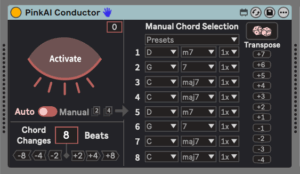
In its default setting (referred to as “auto” on the controls), the Conductor chooses what harmonies are generated and how often they change. When you click “activate” on the eye image, PinkAI starts outputting chords.
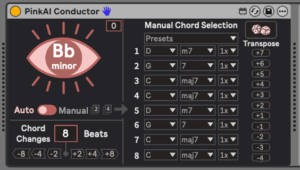
(There’s a second side to the Conductor module, called “manual” mode, which bypasses the AI element and lets you choose specific, predetermined chords, instead of deferring to PinkAI’s preferences. There’s also a variety of common chord progressions available as presets. So there are many options for using PinkAI without having the AI side of things take the steering wheel.)
While the Conductor module chooses harmonies, the task of actually turning those chords into music is handled by the Performer module.
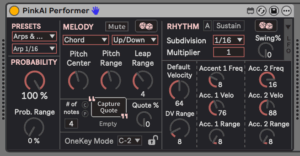
The Performer receives chords sent by the Conductor, and interprets those harmonies based on settings for pitch, range, rhythm, probability, and many other factors. It then transmits MIDI, which can be sent to an instrument or recorded to a separate track for editing and arranging after the fact.
It’s worth noting that you can have many different Performer modules on different tracks, each one feeding a different instrument with different settings. Any active Performer module in a Live session will automatically sync with the Conductor.
Other PinkAI devices, such as HarmonAIzer and Pink Pong, can be used as drop-in replacements for the Performer module. Each one has a different design angle and feature set, and will interpret the Conductor’s chords in unique ways. We’ll be focusing on the stock Performer module for the most part, but will also examine HarmonAIzer towards the end.
Also, be aware that the Composer doesn’t actually output MIDI by itself. Instead, it sends chord choices to the Performer modules using PinkAI’s own internal network. So you’ll need some kind of Performer module to “receive” the chord choices, and output them as MIDI, to hear anything.
Finally, I’d be remiss not to mention the PinkAI YouTube channel, which goes into great detail about the many possibilities to be had with this ecosystem.
PRELIMINARY IMPLICA(I)TIONS OF PINKAI
Let’s begin by using the stock Performer module to hear PinkAI in action. We’re using the “Arp 1/16” preset (as shown in the image above), which interprets the chords as a steady, flowing series of arpeggios. The example below uses that preset alone, with no modifications made during the performance.
Using a straightforward Performer setting lets us focus on the chords the Conductor is creating. There are several things to notice here:
- First, the movement between chords sounds “good,” in the sense that they have an intentional, coherent flow. It’s not just a bunch of random chords being chosen haphazardly.
- Secondly, the chords don’t stay in one key for very long; there are subtle but significant modulations happening at pretty frequent intervals. At any given point, a series of chords might imply a specific key center, but the nature of the Conductor’s choices is such that it won’t stay in that key for very long. Movement from one chord to the next tends to be based around common tones and voice leading, at least as much as concepts of functional harmony.
- Finally, note that there’s no splitting chords into repeating phrases and sections, or deliberate re-statement of harmonic ideas. The Conductor chooses chords that flow from one to another, but it doesn’t decide when it’s come up with a good candidate for a repeating progression. It generates raw material, but exactly how that material gets used is up to the end user.
(If the Conductor happens to output a series of chords that really grabs you, the last two or four harmonies can be selected and pasted using the boxes to the right of the “manual” label, for saving or further editing. )
GUNNING FOR HARMONY
Next, let’s use a different patch as a starting point, and then adjust parameters as we go. We’re using the preset “Machine Gun,” and true to its name, the sound is pretty merciless.
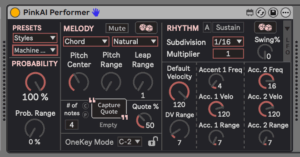
There are three specific parameters we’re playing with in these examples.
- Pitch Center defines the general range that notes will happen in. The lower the setting, the lower the baseline register of the Performer’s output.
- Pitch Range determines how wide a range of pitches the Performer can use, above and below the Pitch Center.
- Leap Range determines how many different chord tones the Performer module can play.
In this first clip, using the default settings for the Machine Gun preset, with Pitch Range and Leap Range both at minimum, we only get a single pitch for each chord. With Probability at 100%, this creates a relentless stream of 16th notes.
In the next example, we start to gradually increase the Pitch Range, Leap Range, and Pitch Center controls. Before long, we have pitches and chord tones dancing all across the audible spectrum.
RACKING UP PERFORMERS
The two presets we’ve looked at so far are single-Performer presets, available within the device itself. Now we’re going to look at a more sophisticated category of presets, which use Live racks to leverage PinkAI’s functionality across multiple instances. The following examples use the “Ultimate Ambient Generator” preset, which contains seven different Performer devices, along with a series of macros to adjust parameters across those various instances.
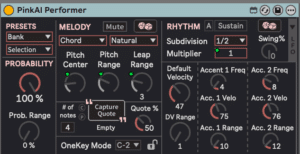
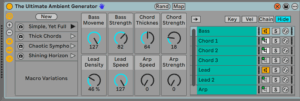
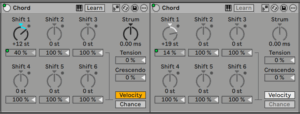
Throughout these examples, macros are used in different ways. Sometimes one of the preset rows is selected; other times, the randomize button is used. Either way, the macros are being constantly adjusted throughout.
POLYRHYTHMIC SQUEE
Next up is the “Polyrhythmic Adventure” preset. It’s another rack-based patch, using five discrete Performer modules, and macros that live up to the title by harnessing multiple simultaneous rhythmic divisions.
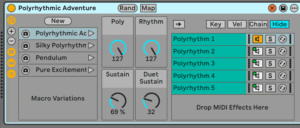
Here again, development throughout the examples comes from a combination of presets and randomized macro settings, with ongoing adjustments to the various controls throughout.
EXPANDING BEYOND THE CORE PINKAI PLUGIN
For the final example, we’re going to replace the stock Performer module with an instance of a different product from the PinkAI ecosystem: the HarmonAIzer.
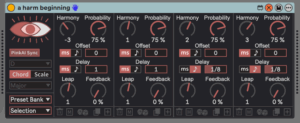
The HarmonAIzer’s core concept is polyphony. It can run up to nine simultaneous “voices,” each with its own settings for chord tones, timing, offset, and probability. Additionally, each voice can be fed into its own discrete “MIDI delay” line. (Having delay as a MIDI effect instead of an audio effect opens up a host of unusual possibilities, including feedback patterns where each successive repeat within a delay ascends or descends to a new chord tone.)
A couple of important notes about the HarmonAIzer:
- Unlike PinkAI’s Generative Composer package, the HarmonAIzer can operate as a stand-alone MIDI effect. It can process incoming MIDI notes (whether from a Live clip, a MIDI sequence, or live input), in addition to working as a drop-in replacement for the Performer module (which is how we’re using it here).
- The HarmonAIzer needs some kind of MIDI input in order to function. Even if it’s being used as a replacement for the Performer module, there needs to be some kind of MIDI sent to the HarmonAIzer in order for it to work. In the following examples, we’re using a Live clip of quarter notes on a single pitch. You’ll notice that a steady quarter-note pulse remains consistent throughout the examples, even as the pitches and subdivisions go through countless transformations.
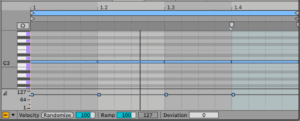
With all that in mind, here’s a few excerpts taken from a longer exploration with HarmonAIzer.
I find the HarmonAIzer to be almost absurdly fun to work with. These examples involve ongoing modification and manipulation of various parameters across all four “voices” of this particular instance. Whether as a “receiver” device for the PinkAI Conductor, or as a stand-alone MIDI effect, it’s wildly inspiring, and very easy to get lost in.
PRODUCT DEMO VIDEO
Below is a product demo from the developer.
LEARNING THE MACHINE
This article hasn’t had any musings on the philosophical or moral implications of AI, so let me summarize my feelings – and my experience with PinkAI – here.
One of my core beliefs is that our understanding of music (or any kind of art/entertainment) does not, ultimately, come from discussing it. It comes from actual music/art/entertainment that’s made, which we can then respond to as creators and audiences.
With that in mind, the most meaningful way of grappling with the implications of AI is by actually working with it. What state does it put us in as creators? What kinds of opportunities does it create for performers, composers, and producers? What sorts of listening experiences can an audience have?
As both a creator and a listener, I find the PinkAI ecosystem to be a fascinating and frequently inspiring territory to explore. Setting aside the harmonic creation angle, I’m a huge fan of generative techniques, and the Performer and HarmonAIzer modules have a wealth of options in that regard. (Again, it’s worth reiterating that the Conductor can “turn off” the AI component and work with specific, pre-determined harmonies.) Individual agency aside, there have also been several “Wow, that’s a really nice chord change!” moments where I jotted down/saved a particularly appealing series of harmonies that PinkAI produced by itself.
Maybe most importantly, here’s one consistent reaction I’ve had to PinkAI: the more direct involvement I have as an active participant in the creation process, the more I enjoy both the process and the results. Given concerns about AI replacing human creators, or rendering them unnecessary, that’s a crucial point to consider.
One of the biggest draws of music technology in general, and artificial intelligence in particular, is the exploration of creative possibilities that weren’t there before. PinkAI offers that in ways that are fascinating, and often extremely compelling. It harnesses machine learning in a powerful, clear-cut manner, while leaving plenty of room for human interaction and creativity. Deep credit to 4 Chamber Sound for exploring these possibilities with tools that are highly accessible in their approach, and very deep in their potential range.
ABOUT THE AUTHOR
Andre LaFosse is a music teacher and transcriber, guitar owner, producer/engineer, composer/improviser, devil’s advocate of live looping, synthesizer dilettante, and general tortured artist. He is equally at home and/or out of place in the worlds of instrumental performance and electronic programming. His music-making explores various ways of reconciling, uniting, contrasting, and/or fighting those two facets of sound creation. A graduate of California Institute of the Arts, Andre’s work has been covered in publications and outlets including Guitar Player, Electronic Musician, Tape Op, Time Out New York, WNYC Radio’s New Sounds, Alternative Press, Make Weird Music, and many others. His recorded body of work is currently available through 7D Media. Check out his YouTube Channel for reviews and product demos.
EXTRAS
Want to win a free license to Kontakt 8? Be one of the first 1000 people to FOLLOW WAVEINFORMER ON INSTAGRAM to be automatically entered to win one of three full-version Kontakt 8 licenses! Read more.
Assess your knowledge of essential audio concepts using our growing catalog of online Quizzes.
Explore more content available to Subscribers, Academic, and Pro Members on the Member Resources page.
Not a Member yet? Check the Member Benefits page for details. There are FREE, paid, and educational options.