OEKSOUND SOOTHE3 INTRODUCTION
In this oeksound soothe3 review, I will discuss this exciting new plugins’ features, sound quality, real-world applications, and whether this intelligent resonance suppression plugin is worth adding to your mixing and mastering toolkit.
There are a handful of plugins that have fundamentally changed the way I work. The original soothe from the Finland-based oeksound was one of them. When oeksound first introduced soothe, it offered something that the mixing world had quietly been waiting for without quite knowing it — a tool that could intelligently identify and attenuate problematic resonances in real time, without the need to manually notch out offending frequencies with a static EQ. I was an early adopter, and I’ve been using soothe in one form or another ever since. soothe2 became an indispensable part of my production, mixing and mastering workflow, and honestly, I couldn’t imagine working without it.
I’m also a committed fan of everything oeksound has released. Spiff reimagined transient processing in a way that felt genuinely original, and bloom — their adaptive tone shaper — has since found a permanent home in a significant number of my sessions. These are people who build tools that solve real problems, and they do it with elegance. So when soothe3 was recently announced, my expectations were already high. Having now spent considerable time with it, I’m pleased to report that oeksound has not only met the bar — they’ve raised it.
NEW FEATURES
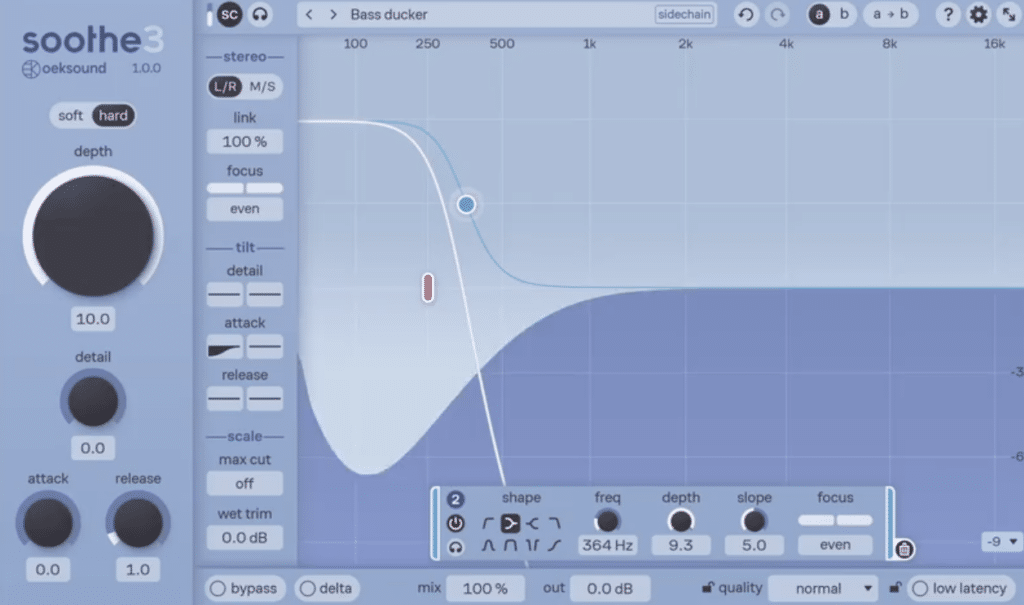
The most significant development in soothe3 is a completely revised algorithm offered in two distinct modes, each serving a different purpose.
Soft Mode is oeksound’s most transparent resonance suppression to date, employing an adaptive threshold that responds dynamically to the program material. This is the new go-to for most sources — it handles dynamic instruments particularly well, applying just enough correction without the heavy-handedness that can sometimes be noticeable at higher depth settings in soothe2. It’s subtle in the best way, meaning it sounds more like the problem was never there in the first place.
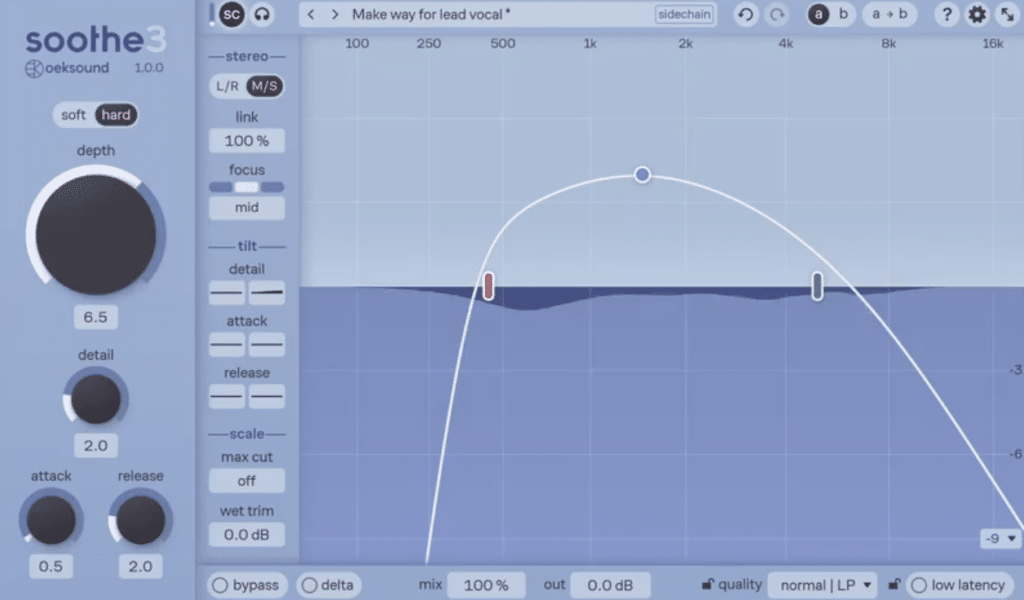
Hard Mode, on the other hand, operates in the style of soothe2 with a fixed threshold, and is better suited for more aggressive resonance control or the popular sidechain effects that many producers have come to rely on. It’s good that oeksound preserved this behavior — soothe2’s character was beloved for a reason, and having it accessible as a dedicated mode rather than forcing users to adapt to the new algorithm is a thoughtful decision.
Low Latency Mode is a genuinely exciting addition, adding zero samples of latency at base sample rates and approximately 1 millisecond at higher sample rates. This opens soothe3 up for tracking and live applications in a way that previous versions simply could not accommodate. Being able to run soothe on a vocal chain during tracking — for a singer monitoring through headphones, for instance — is a significant workflow expansion.
The Detail parameter consolidates what was previously a two-control system (sharpness and selectivity in soothe2) into a single, streamlined control. This is the kind of refinement that reflects real-world use — fewer decisions in the moment, better results faster.
Multichannel support brings soothe3 into post-production and immersive audio territory in a serious way, with configurations supported up to 9.1.6. Channel linking is fully configurable, which is exactly what you need when working in Atmos or other spatial formats where individual channel correction may be necessary.
Tilt Controls allow users to scale detail, attack, and release in a frequency-dependent manner — a level of nuance that experienced users will find genuinely useful, particularly on complex sources where different parts of the frequency spectrum behave very differently over time. The Max Cut parameter is similarly valuable, allowing you to drive soothe harder while keeping the most extreme cuts from going too far. And the addition of Linear Phase Mode is welcome for parallel processing scenarios and mid-side work where phase coherence matters.
GUI UPGRADES
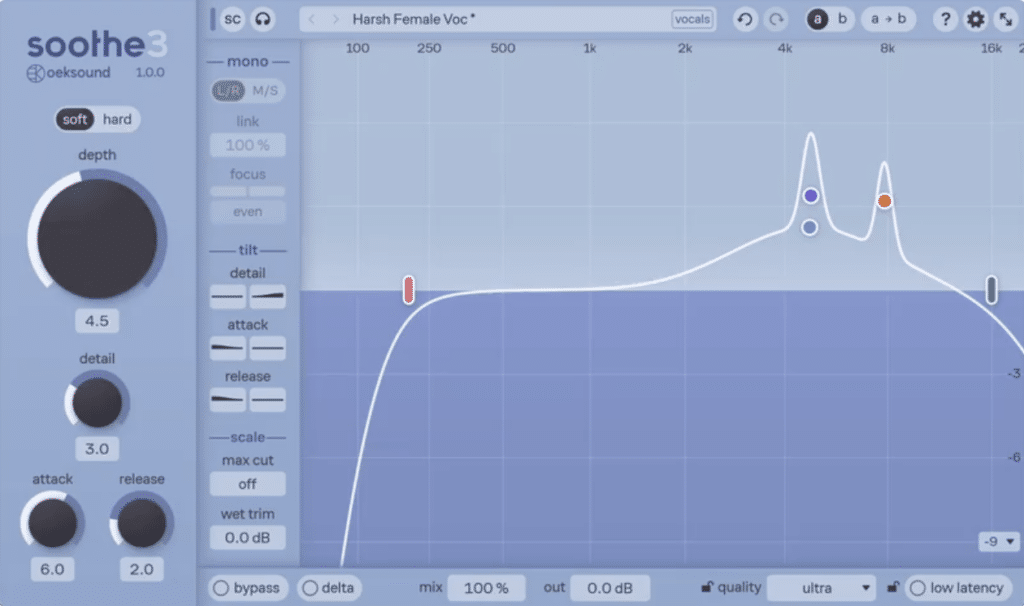
Oeksound has always had exceptional visual design sensibility — their GUIs are clean, purposeful, and genuinely beautiful without being flashy. Soothe3 continues that tradition with several meaningful improvements.
The collapsible side panel is the most immediately noticeable change. Essential controls remain accessible at all times, while more advanced settings can be tucked away when you’re moving quickly through a session. It’s a smart organizational decision that reflects how different users work at different stages — you don’t always need access to every parameter every time you open the plugin.
Node flexibility has been significantly expanded. Users can now create or delete nodes freely and choose from eight different band shapes — including bandpass and tilt — which gives you far more surgical control over where and how soothe is applying its processing. This is the kind of update that sounds incremental until you actually use it, at which point it starts to feel essential.
The overall interface remains consistent with oeksound’s visual language — elegant, dark, and highly readable — while feeling meaningfully updated. This is a plugin you want to look at, and more importantly, it communicates what it’s doing clearly. The visual feedback of soothe’s activity has always been one of the more satisfying parts of the experience, and soothe3 doesn’t change that.
If I’m being honest, I expected soothe3 to be a feature update. More options, a cleaner interface, some workflow polish — the kind of release that makes a great plugin more convenient without fundamentally changing what it sounds like. I was wrong about that, and pleasantly so.
SOUND QUALITY
The improvement in sound quality is perhaps the most meaningful upgrade in soothe3, and it caught me off guard. There is a noticeable increase in clarity and transparency compared to soothe2, particularly at higher depth settings where the processing tends to become more audible on complex material. With soothe2, there was a ceiling — a point beyond which pushing harder started to introduce artifacts that required you to back off and find a compromise between correction and character. Soothe3 raises that ceiling considerably. You can drive the plugin further into the material and the result still sounds like the source, only better. That’s not a small thing.
This improved transparency is most apparent on sources that demand both significant correction and sonic integrity — lead vocals during mastering, dialogue in post, acoustic instruments on a mix bus. Places where you need the plugin to do real work without leaving fingerprints. Soothe3 manages that with a composure that its predecessor couldn’t quite match at equivalent settings. The Soft Mode algorithm deserves much of the credit here, but even Hard Mode benefits from what appears to be a fundamental improvement in the underlying processing. After years with soothe2, I didn’t think the sound quality gap between versions would register the way it did. It registers.
APPLICATIONS
The applications for soothe3 are broad, and the new features meaningfully expand what was already a versatile processor.
Vocals remain the obvious starting point. Soothe3 in Soft Mode is exceptional on lead vocals — it handles the constantly shifting resonant peaks of a singing voice with a transparency that’s genuinely impressive. You can tame honkiness in the 800Hz–1.2kHz range, deal with nasal buildup in the mids, and address upper-midrange harshness without the surgical stiffness of a multiband compressor or the commitment of a static notch. With the new Low Latency Mode, you can now use it in your vocal tracking chain, which is something I’m looking forward to experimenting with further.
Acoustic instruments are where Soft Mode really shines. Guitars, piano, strings — anything with complex, time-varying harmonic content benefits enormously from an adaptive threshold. Soothe3 lets you correct resonance issues that shift with the performer’s dynamics without over-correcting during quieter passages.
Drum processing is where Hard Mode earns its keep. Sidechain effects on drums have become a staple in certain production styles, and having soothe2-style behavior accessible as a dedicated mode means you don’t have to keep soothe2 around just for that. The Max Cut parameter is particularly useful here — you can push the depth further without the occasional overreach that could creep in at extreme settings.
Mastering is where I find myself reaching for soothe most frequently. Soothe3’s improved transparency makes it even more suitable near the end of a chain, where artifacts from heavy-handed processing are most audible. The Linear Phase Mode is a welcome addition for parallel processing in a mastering context, and the expanded multichannel support means soothe3 is a legitimate tool for spatial audio mastering as well.
Post-production and dialogue are use cases that soothe has always served well — resonant room modes in ADR, proximity effect buildup on boom recordings — and the multichannel configuration support with per-channel linking control makes soothe3 a more serious option for those workflows than any previous version.
OEKSOUND SOOTHE3 SUMMARY
Soothe3 is the best version of what has always been one of the most useful modern plugins. The dual-mode algorithm — Soft and Hard — gives users genuine options for how they want the plugin to behave, rather than forcing a one-size-fits-all approach. The improvements to workflow, functionality, and sound quality reflect a team that listens carefully to how their tools are actually used.
I’ve been using soothe since the original release, and I can say without hesitation that soothe3 represents a meaningful step forward rather than a cosmetic update. Oeksound continues to be one of the most thoughtful plugin developers in the business, and soothe3 cements their flagship as the gold standard of resonance suppression. If you’re a soothe2 user, the upgrade is worth it. If you’ve somehow never used soothe, this is the version to start with.
ABOUT THE AUTHOR
Ian Vargo is a Music Producer, Mix & Mastering Engineer, and Multi-Instrumentalist whose work has been heard on broadcast television, nationally televised ad campaigns, award-winning films, and viral web content amassing over 30 million views. His credits include projects for Disney | ABC, Intel, MSNBC, Airbnb, EA Games, and many more.
With over 20 years of experience in the studio, Ian has contributed to major label releases (Capitol, EMI, Fueled by Ramen, Universal, Interscope, Hollywood Records) as well as acclaimed independent projects. His passion lies in helping artists translate their creative vision into professional, release-ready recordings that stand out in today’s music landscape.
Interested in working together? Reach out at ianvargo@gmail.com if you need mixing or mastering for your next project.